AI assistant for optical stores: Lê runs your storefront
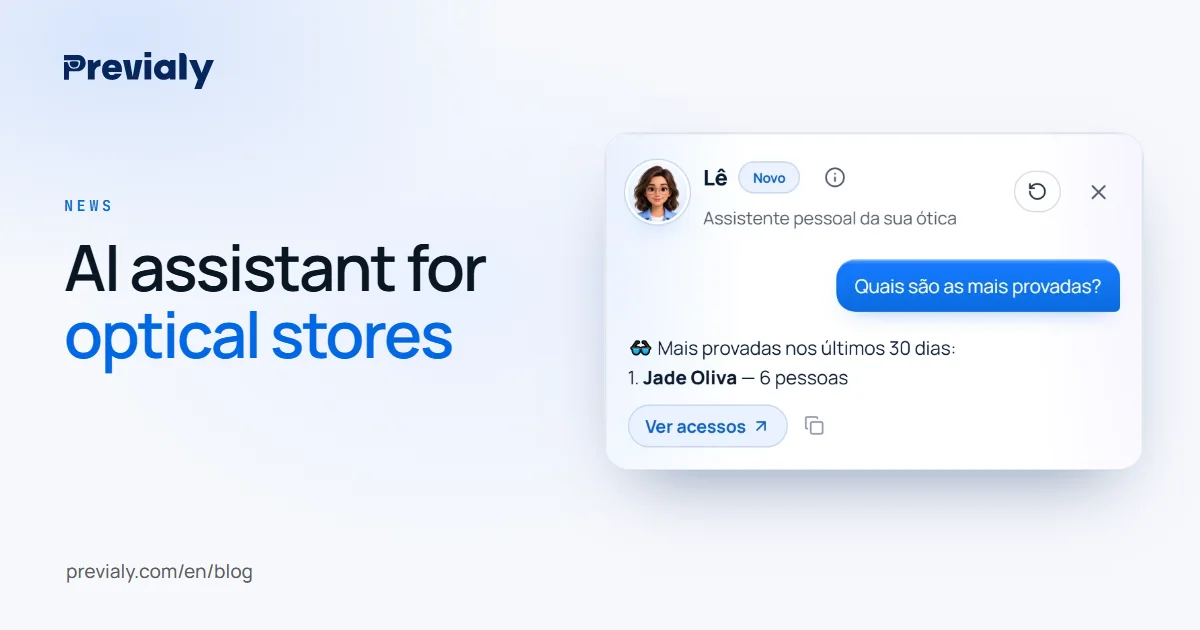
Lê is Previaly's AI assistant for optical stores and resellers. She tells you how many tried on and what sold, changes prices and adds frames via WhatsApp.
Key takeaways
- Lê is each store's personal assistant in Previaly, in the panel and on WhatsApp.
- She tells you in seconds how many people tried on, how much you sold and which models were tried on the most.
- She also changes prices, takes frames offline, records sales and adds products from a photo.
- Nothing changes until you confirm, and deleting, password and plan stay manual.
What an AI assistant for an optical store is
An AI assistant is a team member you reach by message. Instead of looking for the right screen, filter and button, you write what you want, as you would to an employee: "how much did I sell this week?", "change the Aviator's price to 390".
In Previaly, that assistant is called Lê. She knows your storefront, your frames, your orders and your numbers, and works in the panel and on WhatsApp.
What Lê does
You can write or send a voice message. Some everyday examples:
- Numbers: "how many visits did I get today?", "how much did I sell this month?", "which frames were tried on the most?"
- Frames: "take the Aviator offline", "change the Aviator's price to 390"
- Sales: "I sold the Aviator for 450 to Maria, by Pix"
- Customers: "add the customer Ana, 11 98765-4321"
- Page: "change the page color to burgundy"
- Adding by photo: forward the frame photos with a caption (brand, code, price) and she adds them.
On each panel screen, she suggests the questions that make sense there: in Orders, "any new orders?"; in Products, "which frames don't have the try-on ready?".
Nothing changes until you confirm
Lê shows what she is about to do and waits for you to tap Confirm. If she got it wrong, just say "no" and correct her.
Some things she won't do by message, on purpose: deleting, changing the password and changing the plan stay in the panel, done manually, for security.
In the panel and on WhatsApp
In the panel, Lê sits in the middle of the home screen and beside every other screen, so you can talk to her without leaving what you are doing.
On WhatsApp, she works the same way. It's the fastest path for anyone who spends the day at the counter or on the road: send a voice message, she answers; send a frame photo, she adds it.
Adding frames from a photo
For stores with many frames, adding them one by one on a computer is what takes the most time. With Lê, you forward the photos on WhatsApp with a caption and she creates the product with name, code and price, and prepares its virtual try-on model.
The front photo becomes the try-on: see how to photograph glasses to sell online and how to add frames to the virtual try-on.
Who she is for
- Optical store owners, who want to know how the storefront is doing without opening a report.
- Resellers and independent sellers, who sell from their phone and need to add and adjust everything without a computer.
Lê is part of the Previaly panel, together with the live virtual try-on and the online storefront. See everything on the Previaly home page.
Frequently asked questions
What does Previaly's AI assistant do?
Lê tells you how many people tried on, how much you sold and which frames were tried on the most. She also changes prices, takes frames offline, records sales, adds customers and adds frames from a photo, in the panel and on WhatsApp.
Does Lê change anything without asking?
No. She shows what she is about to do and only changes it after you confirm. Deleting, changing the password and changing the plan stay in the panel, for security.
Can I talk to Lê by voice message?
Yes. In the panel and on WhatsApp, you can write or send a voice message.
Does Lê talk to my customers?
No. Lê is the store's assistant: she helps you run the storefront and the panel. Your customers talk to you, on your WhatsApp.
The Previaly team
We build the virtual try-on, the online storefront and the AI Studio that optical stores use to sell from the customer's phone. These guides come from what we see every day in the product and in our work with stores.